Find the trades that are costing you money.
Screenshot your MT5, Bybit or Binance history. TraderCater reads it, builds your trading journal, and shows which pair, session and habit is losing you money.
Free plan: 2 AI imports a day, no card needed. No broker connection.
From screenshot to answers in three steps
No typing out trades, no spreadsheet.
- 1
Upload a screenshot or CSV
Screenshot your trade history from MT5, Bybit, Binance, Deriv or any broker, or upload an MT5 CSV. No broker connection needed.
- 2
Check what we read
Rows that look misread, like a dropped decimal point, are highlighted with a suggested fix. Confirm, and your trades are saved.
- 3
Read your findings
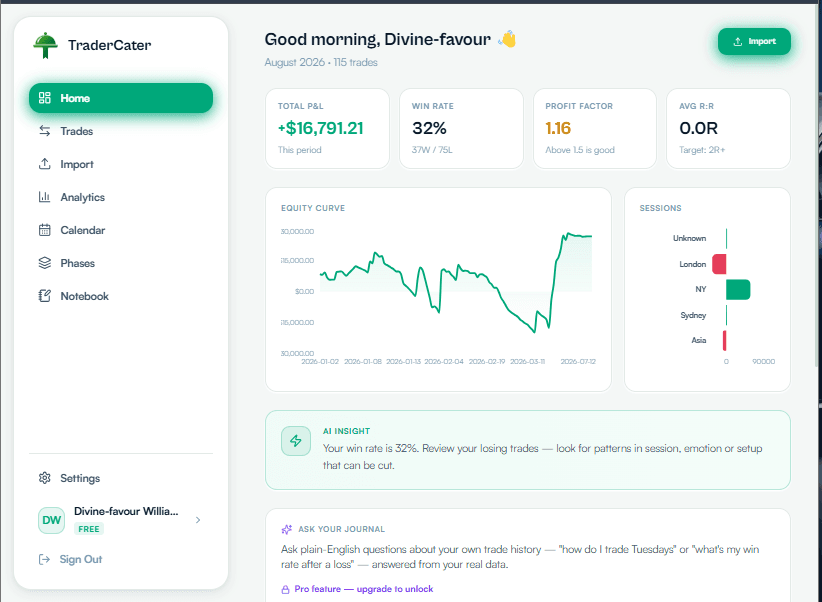
See results by day, session and symbol, and how your emotions line up with your profit and loss.
A real MT5 screenshot being imported. No sound.
What you get once your trades are in
Most of this is on the free plan. Ask your journal needs Pro.
The psychology, Ask your journal and MFE and MAE screens use example numbers.
Analytics
Win rate, profit factor, average R:R, best days, and results by session and symbol.
P&L calendar
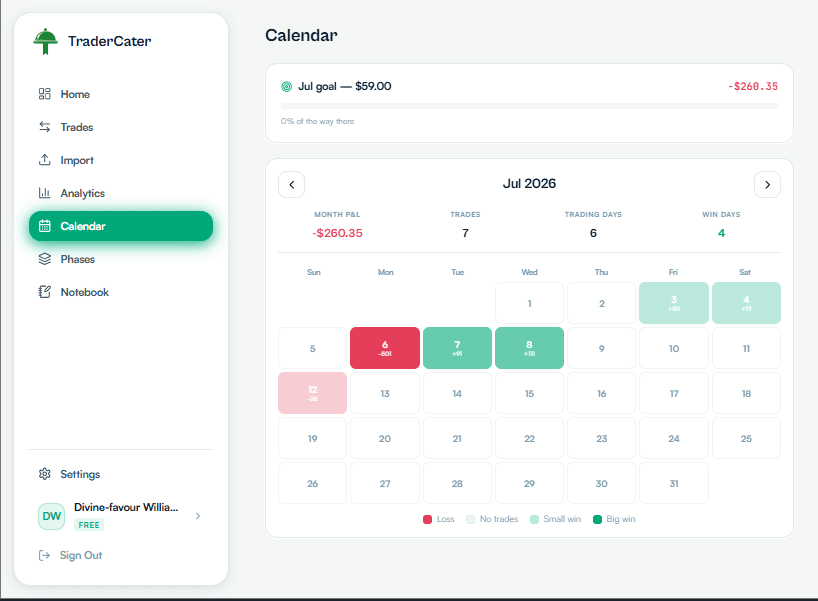
Daily profit and loss on a calendar, so your best and worst days stand out.
Psychology tags
Tag each trade with your emotion, your setup, and whether you followed your plan. Then see how each emotion changes your results.
Psychology analysis
How your emotions affect your results
Ask your journalPro
Ask "how do I trade Fridays?" or "what is my win rate after a loss?" and get an answer from your own data.
Ask your journal
ProYou asked
How do I trade Fridays compared to other days?
Answer
Your Friday win rate is 38%, below your 61% Monday to Thursday average. Most of the drop comes from XAUUSD trades taken in the New York session.
MFE and MAE
How far price moved in your favor and against you on every trade, shown against your actual entry and exit.
EURUSD buy
How far price moved for you and against you
Your journal is stored privately. Nobody else can see it.
Works with the platform you already use
If you can see your trade history, you can screenshot it.





Any Broker
ScreenshotAny Broker
ScreenshotOther journals start with an export
Many ask you to export CSVs or connect a broker API first. TraderCater starts with a screenshot of the trades already on your phone.
Start free. Upgrade when it's worth it.
No credit card required to start journaling today.
Free
$0
forever
Pro
$7.99/mo
per month
Free 7-day trial
Pro+
$19/mo
per month
No credit card required · Cancel anytime
FAQ
Questions, answered
Yes — TraderCater is freemium. The Free plan costs nothing and doesn't expire — 2 trading accounts, 2 AI screenshot imports/day, unlimited manual/CSV entry, and the full analytics dashboard, no card required. A paid Pro plan ($7.99/mo) is available if you outgrow those limits.
It's tuned specifically for MT5 mobile history screens and is accurate for standard formats, but AI extraction can occasionally misread a number or symbol. Before anything is saved, the preview highlights rows that look misread (for example a dropped decimal point) and suggests a fix. Still give your trades a quick look before relying on them for tax reporting or performance decisions.
MT5 and MT4 natively, plus Bybit, Binance, KuCoin, Deriv — and honestly, any broker at all, since you can always screenshot your history or upload a CSV. If you can see it, you can journal it.
Yes — your trades are stored in your own private account and no other user can see them. See our full Privacy Policy for exactly what we collect and why.
We don't permanently store the raw screenshot after extraction unless you explicitly attach it to a trade yourself. The image is only used momentarily to pull out the trade data.
Pro ($7.99/mo) removes the account cap (unlimited accounts), raises screenshot imports to 50/day, unlocks Ask Your Journal (20 AI questions/day about your own trading data), and adds CSV/PDF export plus priority support — and starts with a 7-day free trial (card is held but you're not charged until day 7, cancel anytime before then). MT5 auto-sync is a separate, not-yet-released Pro+ tier — join the waitlist in Settings if you want it.
Yes, from Settings in one click. During the 7-day free trial, cancelling means you're never charged at all. Once you're a paying subscriber, you keep Pro access through the rest of your paid period and just aren't billed again. Full details in our Refund Policy.
Payments are processed by Flutterwave (Nigeria), Paddle (international cards), or NOWPayments (crypto) — we never see or store your card number. Card subscriptions bill automatically each month until you cancel.
No. TraderCater is an analytics and journaling tool only — it helps you see your own patterns, it doesn't recommend trades, strategies, or brokers. All trading decisions and risk are yours.
Still have a question? support@tradercater.com
Trade on the go
Download TraderCater directly or add it to your home screen for a native app experience.
Android
Download the APK directly and install on your Android phone. No Play Store needed.
Download APKEnable "Install unknown apps" in settings if prompted
iPhone
Add TraderCater to your iPhone home screen via Safari. Works like a real app — fullscreen, fast, offline.
View iPhone GuideStep-by-step guide to add to home screen
As Featured On