Screenshot In. Journal Out.

Journal every trade.
Understand your edge.

Screenshot your MT5, Bybit, or Binance trade history — our AI reads it, builds your journal automatically, and tags the psychology behind every trade, so you see not just what happened but why. No broker connection, no manual entry. Free plan includes 2 AI imports a day, forever, no card required.

Loved by traders
No credit card required
Works on any device
tradercater.app/dashboard
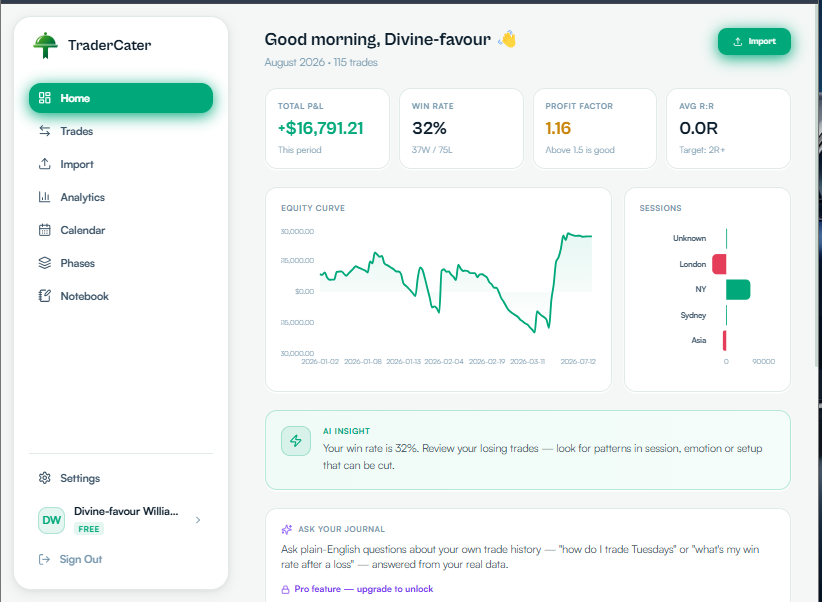
TraderCater dashboard showing total P&L, win rate, profit factor, equity curve and recent trades
See it in action

Screenshot. Import. Done.

No typing, no CSV wrangling. Watch a real MT5 history screenshot turn into structured, journaled trades in seconds.

Real product footage — no sound, on loop.

Features

Everything you need to trade smarter

Built specifically for serious traders who want to improve their edge through data.

Screenshot Import

Any Platform

Screenshot your trade history from any broker — AI reads and extracts all data automatically. No manual entry.

CSV Import

MT5 / MT4

Export your MT5 trade history as CSV and upload it. All trades imported instantly with full details.

Deep Analytics

Insights

Win rate, profit factor, average R:R, best trading days, session breakdown, symbol performance — all in one place.

P&L Calendar

Visual

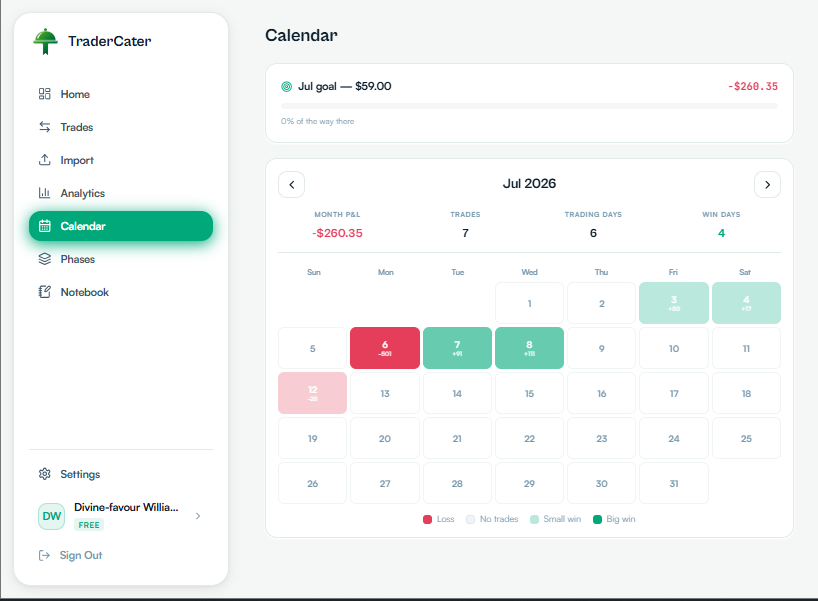
See your daily profit and loss on a heatmap calendar. Instantly spot your best and worst trading days.

Psychology Tracking

Mental Edge

Tag each trade with your emotion, setup, and whether you followed your plan. See how your mindset affects your results.

Ask Your Journal

Pro · AI

Ask plain-English questions about your own trading — "how do I trade Fridays" or "what’s my win rate after a loss" — answered from your real data.

MFE/MAE Analysis

Advanced

See how far price moved in your favor and against you on every trade, plotted against your actual entry and exit.

Secure & Private

Encrypted

Your trade data is stored privately. Nobody else can see your journal. Powered by Supabase with row-level security.

Not another spreadsheet with extra steps

Most journals still make you do the boring part yourself

CSV wrangling, tagging every trade's psychology by hand, connecting a broker API just to log a trade. TraderCater reads your screenshot and tags the mindset behind it automatically — no broker connection required.

A closer look

Built for the daily grind of trading

The six screens you'll actually live in — from your morning check-in to the phase you're grinding through right now. Tap any screen to view it full-size.

Node 01 · Tracking Node

See every trading day at a glance

A heatmap of every day you've traded — green for green days, red for red ones, shaded by how big the swing was. No spreadsheet required to spot that your Wednesdays are carrying the month, or that Fridays keep bleeding you out.

  • Heatmap coloring shows your best and worst days instantly
  • Click any day to see every trade behind the number
  • Track progress against your monthly goal in real time
Explore the calendar
Node 02 · Planning Node

Keep your trading plan somewhere it won't get lost

Trading plans, watchlists, weekly reviews — the thinking that shapes your results but never fits inside a single trade. TraderCater gives it a home right next to your data, so your plan and your P&L are never more than a click apart.

  • Pin the entries you reference most
  • Search across every plan and review you’ve written
  • Free-form — no rigid template
Explore the notebook
Node 03 · Overview Node

Your whole month, the second you log in

No digging through tabs to find out how you're doing. Total P&L, win rate, profit factor, and your equity curve — all waiting on the home screen before you've even opened your first chart.

  • One glance tells you if this period is a win or a loss
  • AI insight flags patterns worth acting on
  • Session breakdown shows where your edge comes from
See your dashboard
Node 04 · Insight Node

Numbers deep enough to actually change how you trade

Profit factor, average R:R, drawdown, win and loss streaks — the stats that separate a hunch from an edge. Filter by week, month, or all time, then export a clean statement whenever you need one.

  • 12+ core metrics recalculated instantly
  • Per-trade MFE/MAE shows how far price ran for and against you
  • Full statement export — P&L, symbols, risk
Dig into analytics
https://tradercater.app/analytics
Node 05 · Query Node

Just ask your journal what's actually going on

Skip the spreadsheet gymnastics. Type a plain-English question — 'how do I trade Fridays compared to other days,' 'what's my win rate after a loss' — and get an answer pulled straight from your own trade history, not a generic tip.

  • Answers grounded in your real trades
  • Ask about sessions, symbols, emotions, streaks
  • 20 questions/day on Pro
See Pro pricing
https://tradercater.app/ask

Ask Your Journal

PRO
How do I trade Fridays?
Win rate after a loss?

YOU ASKED

How do I trade Fridays compared to other days?

ANSWER

Your Friday win rate is 41% — well below your 68% weekday average. Most of the drop comes from XAUUSD trades taken after 2pm. Consider sizing down or skipping Friday afternoons.

Node 06 · Challenge Node

Running a prop firm challenge? Keep it separate.

Each phase gets its own clean slate — P&L, win rate, and trade count reset for that specific challenge or funded account, so your personal stats never blur together with a firm's evaluation.

  • Snapshot stats scoped to the active phase only
  • Switch between phases without losing old history
  • Full reset when a new challenge starts
See how phases work
How it works

Up and running in 2 minutes

No complex setup. No connecting to brokers. Just import and go.

01

Create your free account

Sign up in 30 seconds. No credit card, no subscription. Just your email and password.

02

Import your trades

Upload a CSV from MT5, or screenshot your history from Bybit, Binance, Deriv — any broker. AI reads it.

03

Analyse and improve

See your win rate, best days, emotion patterns, symbol performance. Add notes to each trade.

Platforms

Works with every broker

Trade on any platform — just screenshot your history and TraderCater does the rest.

MetaTrader 5
CSV + Screenshot
MetaTrader 4
CSV + Screenshot
Bybit
Screenshot
Binance
Screenshot
KuCoin
Screenshot
Deriv
Screenshot
TradingView
Screenshot

Any Broker

Screenshot
MetaTrader 5
CSV + Screenshot
MetaTrader 4
CSV + Screenshot
Bybit
Screenshot
Binance
Screenshot
KuCoin
Screenshot
Deriv
Screenshot
TradingView
Screenshot

Any Broker

Screenshot
Before / After

From a wall of numbers to a clear picture

Drag the handle — this is what your history looks like before and after TraderCater reads it.

AFTER

TraderCater Dashboard

Total P&L

+$4,821

Win Rate

67%

Profit Factor

2.31

Trades

142

BEFORE

MT5 Export.csv

01/15 22:41 EURUSD BUY 0.50 1.08421 → 1.08560 +69.50

01/15 23:02 XAUUSD SELL 0.10 2648.30 → 2651.90 -36.00

01/16 08:14 GBPJPY BUY 0.30 191.220 → 191.610 +117.00

01/16 09:47 BTCUSDT SELL 0.02 61,240 → 60,880 +7.20

01/16 14:03 EURUSD SELL 0.50 1.08602 → 1.08510 +46.00

01/17 03:18 XAUUSD BUY 0.10 2655.10 → 2649.40 -57.00

01/17 11:29 USDCAD BUY 0.40 1.34210 → 1.34380 +68.00

01/17 16:55 GBPJPY SELL 0.30 191.900 → 192.240 -102.00

01/18 02:07 EURUSD BUY 0.50 1.08340 → 1.08490 +75.00

01/18 07:33 XAUUSD SELL 0.10 2660.80 → 2657.10 +37.00

Reviews

What traders say

Real feedback from traders using TraderCater to find their edge.

Screenshotted my Bybit history and it just worked. Did not expect an app that actually reads a phone screenshot correctly.

MO

Marcus O.

MT5 trader

The emotion tags finally showed me I lose most of my money trading FOMO entries during London open. Cut my size in half there.

PK

Priya K.

Forex — London session

Free is doing more for me right now than the paid journal I used before. The symbol breakdown alone is worth it.

DA

Dee A.

Crypto swing trader

Pricing

Start free. Upgrade when it's worth it.

No credit card required to start journaling today.

Free

$0

forever

2 trading accounts
2 AI screenshot imports/day
Unlimited CSV & manual entry
Full analytics dashboard
P&L calendar heatmap
Psychology & emotion tracking
Create Free Account
Most Popular

Pro

$7.99/mo

per month

Free 7-day trial

Unlimited trading accounts
50 AI screenshot imports/day
Ask Your Journal — 20 AI questions/day
CSV & PDF export
Priority support
Everything in Free
Try Pro Free for 7 Days

Pro+

$19/mo

per month

Everything in Pro
Custom rules & violation detection
What-if simulations & AI trade grading
Personal playbook & plan-to-result matching
Advanced weekly coach & deeper Ask Your Journal
Batch import, reconciliation & position grouping
Custom dashboard, data quality & risk tools
Prop-firm challenge mode
Upgrade to Pro+

No credit card required · Cancel anytime

From the blog

Guides for traders who journal

FAQ

Questions, answered

Yes — TraderCater is freemium. The Free plan costs nothing and doesn't expire — 2 trading accounts, 2 AI screenshot imports/day, unlimited manual/CSV entry, and the full analytics dashboard, no card required. A paid Pro plan ($7.99/mo) is available if you outgrow those limits.

Still have a question? support@tradercater.com

Get The App

Trade on the go

Download TraderCater directly or add it to your home screen for a native app experience.

Android

Download the APK directly and install on your Android phone. No Play Store needed.

Download APK

Enable "Install unknown apps" in settings if prompted

iPhone

Add TraderCater to your iPhone home screen via Safari. Works like a real app — fullscreen, fast, offline.

View iPhone Guide

Step-by-step guide to add to home screen

Google Play Store — Coming Soon
App Store — Coming Soon

As Featured On

TraderCater — Screenshot.Import.Analyze. - AI trading journal that works from your trade screenshots | Product Hunt
Featured on ListBulb
Featured on Noonlaunch
Fazier badge